<?xml version="1.0" encoding="utf-8"?><feed xmlns="http://www.w3.org/2005/Atom" ><generator uri="https://jekyllrb.com/" version="4.3.4">Jekyll</generator><link href="http://egonw.github.io/blog/feed/by_tag/kde.xml" rel="self" type="application/atom+xml" /><link href="http://egonw.github.io/blog/" rel="alternate" type="text/html" /><updated>2026-11-19T06:09:00+00:00</updated><id>http://egonw.github.io/blog/feed/by_tag/kde.xml</id><title type="html">chem-bla-ics</title><subtitle>Chemblaics (pronounced chem-bla-ics) is the science that uses open science and computers to solve problems in chemistry, biochemistry and related fields.</subtitle><author><name>Egon Willighagen</name></author><entry><title type="html">Konqueror Web Shortcuts for CHEMINF</title><link href="http://egonw.github.io/blog/2010/12/05/konqueror-web-shortcuts-for-cheminf.html" rel="alternate" type="text/html" title="Konqueror Web Shortcuts for CHEMINF" /><published>2010-12-05T00:00:00+00:00</published><updated>2010-12-05T00:00:00+00:00</updated><id>http://egonw.github.io/blog/2010/12/05/konqueror-web-shortcuts-for-cheminf</id><content type="html" xml:base="http://egonw.github.io/blog/2010/12/05/konqueror-web-shortcuts-for-cheminf.html"><![CDATA[<p>In 2004 I wrote up a short <a href="http://cdknews.org">CDK News</a> <a href="http://www.steinbeck-molecular.de/cdknews/index.php/CDKNews/article/view/16">article</a>
on how to set up <a href="http://www.konqueror.org/">Konqueror</a> web shortcuts for the
<a href="http://cdk.sf.net">CDK</a> (Windows users can download Konqueror <a href="http://windows.kde.org/download.php">here</a>).
They are very handy, and I just found another simple use case, and as I have
not seen it get much attention recently, and it is a great productivity tool,
here goes.</p>

<p><a href="http://code.google.com/p/semanticchemistry/">CHEMINF</a> is an ontology under
development by people at the EBI, Canada and Sweden, for cheminformatics. I
was aggregation <a href="http://code.google.com/p/semanticchemistry/wiki/Examples">examples</a>,
and when you browse these, you immediately run into the problem that all OWL
resources have rather cryptic names, like <a href="http://semanticscience.org/resource/CHEMINF_000000">CHEMINF_000000</a>.
Of course, any decent <a href="http://en.wikipedia.org/wiki/Web_Ontology_Language">OWL</a>
tool will just view the <em>rdfs:label</em>, but I and others prefer to work in plain
text editors, rather than, for example, <a href="http://protege.stanford.edu/">Protege</a>.</p>

<p>Fortunately, the Michel and/or Leonid have made the CHEMINF ontology <a href="http://en.wikipedia.org/wiki/Linked_Data">LinkedData</a>,
which is where the web shortcuts come in. So, CHEMINF_000000 has the <a href="http://en.wikipedia.org/wiki/URI">URI</a>
<a href="http://semanticscience.org/resource/CHEMINF_000000">http://semanticscience.org/resource/CHEMINF_000000</a>.
For the RDF and ontology users, a web shortcut is just like defining a namespace
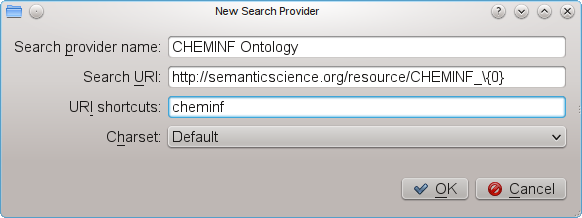
(actually, a bit more general), so we will define <em>cheminf:CHEMINF_000000</em>.
Actually, let’s skip this step, and make use of web shortcuts fully, and define <em>cheminf:000000</em>.
After all, a web shortcut is nothing more than an simple expansion.</p>

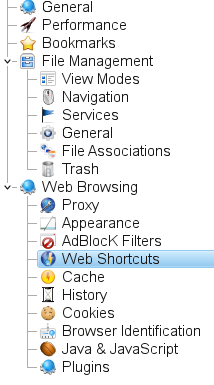
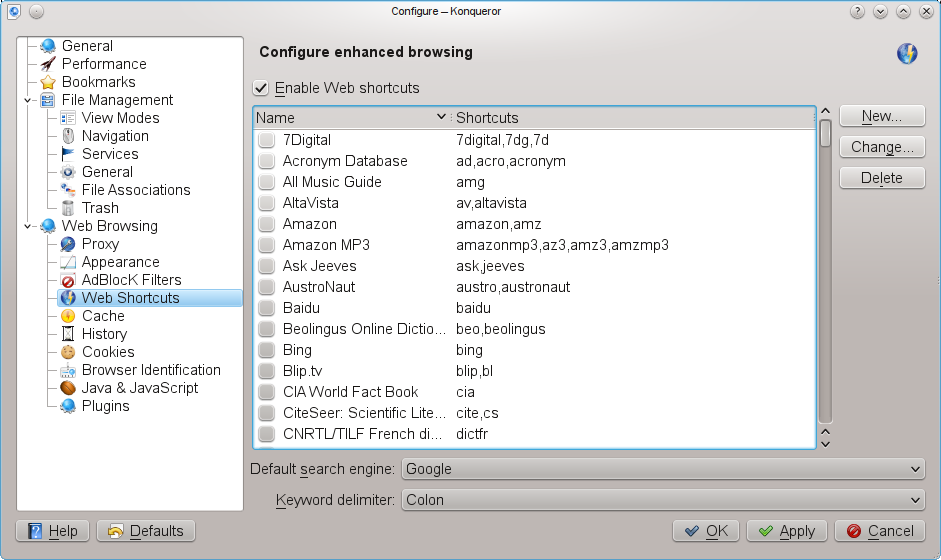
<p>Open Konqueror’s <em>Settings</em> -&gt; <em>Configure Konqueror</em> dialog, and select that <em>Web
Shortcuts</em> page:</p>

<p><img src="/blog/assets/images/ws1.png" alt="" /></p>

<p>Click new New button on the right:</p>

<p><img src="/blog/assets/images/ws3.png" alt="" /></p>

<p>and fill out the dialog like this:</p>

<p><img src="/blog/assets/images/ws2.png" alt="" /></p>

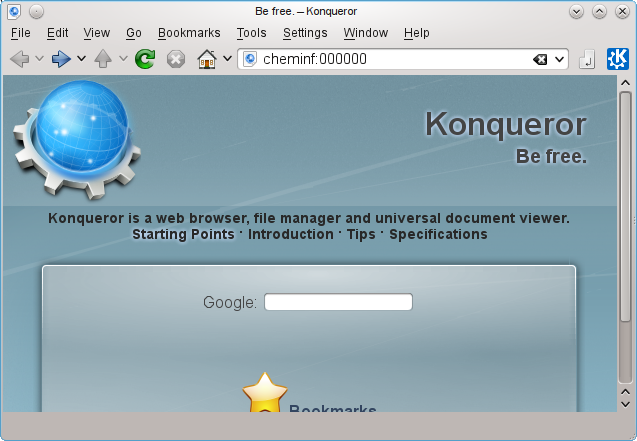
<p>Now, I can open the <em>cheminf:000000</em> URI in Konqueror and get the information
about a CHEMINF resource:</p>

<p><img src="/blog/assets/images/ws5.png" alt="" /></p>]]></content><author><name>Egon Willighagen</name></author><category term="cdk" /><category term="cheminf" /><category term="kde" /><category term="ontologies" /><summary type="html"><![CDATA[In 2004 I wrote up a short CDK News article on how to set up Konqueror web shortcuts for the CDK (Windows users can download Konqueror here). They are very handy, and I just found another simple use case, and as I have not seen it get much attention recently, and it is a great productivity tool, here goes.]]></summary><media:thumbnail xmlns:media="http://search.yahoo.com/mrss/" url="http://egonw.github.io/blog/blog/assets/images/ws1.png" /><media:content medium="image" url="http://egonw.github.io/blog/blog/assets/images/ws1.png" xmlns:media="http://search.yahoo.com/mrss/" /></entry><entry><title type="html">NXClient on Ubuntu Gutsy</title><link href="http://egonw.github.io/blog/2007/08/28/nxclient-on-ubuntu-gutsy.html" rel="alternate" type="text/html" title="NXClient on Ubuntu Gutsy" /><published>2007-08-28T00:00:00+00:00</published><updated>2007-08-28T00:00:00+00:00</updated><id>http://egonw.github.io/blog/2007/08/28/nxclient-on-ubuntu-gutsy</id><content type="html" xml:base="http://egonw.github.io/blog/2007/08/28/nxclient-on-ubuntu-gutsy.html"><![CDATA[<p>If you, like me, already upgrade to <a href="http://www.ubuntu.com/">Ubuntu</a> <a href="https://wiki.ubuntu.com/GutsyGibbon">Gutsy</a>,
and use <a href="http://www.nomachine.com/download.php">nxclient</a> for remote login (highly recommended, though proprietary code),
you might run into the problem that the login no longer works, returning the message “Cannot find KDE environment.”. Ubuntu’s
<a href="http://www.launchpad.net/">Lauchpad</a> (generally an excellent service) was rather uncooperative and disregarded a bug report
about the problem, I found the solution with <code class="language-plaintext highlighter-rouge">grep -ri kde /usr/NX</code>:</p>

<div class="language-plaintext highlighter-rouge"><div class="highlight"><pre class="highlight"><code>/usr/NX/etc/node.cfg:CommandStartKDE="/usr/bin/dbus-launch --exit-with-session startkde"
</code></pre></div></div>

<p>The solution was to:</p>

<div class="language-shell highlighter-rouge"><div class="highlight"><pre class="highlight"><code><span class="nb">sudo </span>aptitude <span class="nb">install </span>dbus-x11
</code></pre></div></div>

<p>which contains the <code class="language-plaintext highlighter-rouge">dbus-launch</code> executable, formerly found in the <em>dbus</em> package itself. I assume it works for
“Cannot find GNOME environment” too.</p>]]></content><author><name>Egon Willighagen</name></author><category term="linux" /><category term="kde" /><summary type="html"><![CDATA[If you, like me, already upgrade to Ubuntu Gutsy, and use nxclient for remote login (highly recommended, though proprietary code), you might run into the problem that the login no longer works, returning the message “Cannot find KDE environment.”. Ubuntu’s Lauchpad (generally an excellent service) was rather uncooperative and disregarded a bug report about the problem, I found the solution with grep -ri kde /usr/NX:]]></summary></entry><entry><title type="html">Finding email with Strigi in .tar backups</title><link href="http://egonw.github.io/blog/2007/06/03/finding-email-with-strigi-in-tar.html" rel="alternate" type="text/html" title="Finding email with Strigi in .tar backups" /><published>2007-06-03T00:00:00+00:00</published><updated>2007-06-03T00:00:00+00:00</updated><id>http://egonw.github.io/blog/2007/06/03/finding-email-with-strigi-in-tar</id><content type="html" xml:base="http://egonw.github.io/blog/2007/06/03/finding-email-with-strigi-in-tar.html"><![CDATA[<p>Now that <a href="http://chemicalblogspace.blogspot.com/2007/05/uploaded-source-code-to-sf-svn.html">my CUBIC desktop machine is shutting down</a>,
I made the necessary backups, among a mail.tar for my mail correspondence of about a year. About 500MB in size for almost 8700 files.
<a href="http://strigi.sf.net/">Strigi</a> is a perfect tool to help me find messages in this archive, as it will recurse into the .tar archive,
and even into email attachements. I created an index just for the archive with:</p>

<div class="language-plaintext highlighter-rouge"><div class="highlight"><pre class="highlight"><code>strigicmd create -t clucene -d index/ mail.tar
</code></pre></div></div>

<p>It took Strigi about 30 seconds to index the whole archive. That’s good performance!</p>

<p>Now, Strigi indexes content full text, but also uses a controlled vocabulary (among which
<a href="http://kemistry-desktop.blogspot.com/2007/04/chemical-semantic-desktop.html">one specifically for chemistry</a>).
So I can search for email messages which have article in the subject with:</p>

<div class="language-plaintext highlighter-rouge"><div class="highlight"><pre class="highlight"><code>strigicmd query -t clucene -d index/ email.subject:article
</code></pre></div></div>

<p>However, <code class="language-plaintext highlighter-rouge">From:</code> and <code class="language-plaintext highlighter-rouge">To:</code> content was not yet extracted. That was easily patched. This allows me to find correspondence between me and, for example, Christoph:</p>

<div class="language-plaintext highlighter-rouge"><div class="highlight"><pre class="highlight"><code>strigicmd query -t clucene -d index/ email.to:Christoph AND email.from:Egon
</code></pre></div></div>]]></content><author><name>Egon Willighagen</name></author><category term="kde" /><summary type="html"><![CDATA[Now that my CUBIC desktop machine is shutting down, I made the necessary backups, among a mail.tar for my mail correspondence of about a year. About 500MB in size for almost 8700 files. Strigi is a perfect tool to help me find messages in this archive, as it will recurse into the .tar archive, and even into email attachements. I created an index just for the archive with:]]></summary></entry><entry><title type="html">New chemistry-on-the-desktop blog</title><link href="http://egonw.github.io/blog/2006/07/01/new-chemistry-on-desktop-blog.html" rel="alternate" type="text/html" title="New chemistry-on-the-desktop blog" /><published>2006-07-01T00:00:00+00:00</published><updated>2006-07-01T00:00:00+00:00</updated><id>http://egonw.github.io/blog/2006/07/01/new-chemistry-on-desktop-blog</id><content type="html" xml:base="http://egonw.github.io/blog/2006/07/01/new-chemistry-on-desktop-blog.html"><![CDATA[<p>I started a spin-off blog earlier this week: <a href="http://kemistry-desktop.blogspot.com/">kemistry desktop environment</a>. It will deal with
integration of chemistry on opensource desktops, with <a href="http://www.kde.org/">KDE</a> as one of them. Today, it features an
<a href="http://kemistry-desktop.blogspot.com/2006/07/overview-of-earlier-blogs.html">overview of earlier blogs</a> on the subject in this new blog.</p>]]></content><author><name>Egon Willighagen</name></author><category term="kde" /><summary type="html"><![CDATA[I started a spin-off blog earlier this week: kemistry desktop environment. It will deal with integration of chemistry on opensource desktops, with KDE as one of them. Today, it features an overview of earlier blogs on the subject in this new blog.]]></summary></entry><entry><title type="html">KDE4 keyword support mockups</title><link href="http://egonw.github.io/blog/2006/06/25/kde4-keyword-support-mockups.html" rel="alternate" type="text/html" title="KDE4 keyword support mockups" /><published>2006-06-25T00:00:00+00:00</published><updated>2006-06-25T00:00:00+00:00</updated><id>http://egonw.github.io/blog/2006/06/25/kde4-keyword-support-mockups</id><content type="html" xml:base="http://egonw.github.io/blog/2006/06/25/kde4-keyword-support-mockups.html"><![CDATA[<p>In reply to interesting comments to <a href="http://chem-bla-ics.blogspot.com/2006/06/strigi-gets-kfile-plugin-support.html">my previous blog</a>
on <a href="http://www.vandenoever.info/software/strigi/">Strigi</a> and xAttr support in <a href="http://www.kde.org/">KDE</a>4, I would like to suggest
the following mockups, which I would find very useful. The deal with the ability to store keywords, for example, not but necessarily
using xAttr. I have no idea on how to implement these mockups, so any help or pointers are appreciated.</p>

<p>The first plot is an example of how these keyword markup could be used in KDE, other than searching itself. When showing the properties
of a directory in KDE, it would show an overview of hottest keywords for that directory, such as used on social bookmark website like
<a href="http://technorati.com/">Technorati</a> too:</p>

<p><img src="/blog/assets/images/kfileXAttrSupport.png" alt="" /></p>

<p>This example shows that the keyword ‘Strigi’ was used much inside the index_files directory (they are not just the keywords given for
that directory, but a summary of the directory content!). Now, these keywords could be stored as xAttr, but in a database too. The
first requires a filesystem that supports xAttr, while the second requires a database daemon to be running. However, for speed
performance reasons this would be required anyway. Strigi indexes xAttr now (post 0.3.0 release), and basically allows both.</p>

<p>Independent of the chosen/prefered way to store keywords, these keywords can be edited from the Properties dialog:</p>

<p><img src="/blog/assets/images/kfileXAttrSupport2.png" alt="" /></p>

<p>Now comes the tricky part: though I would like to add this to KDE, I do not have the C++/KDE experience to actually do this.
I’m already happy that I was able to extend the Strigi with support for KDE’s kfile architecture. Yes, the Strigi version in
SVN will index all metadata extractable with kfile plugins installed on the KDE installation.</p>]]></content><author><name>Egon Willighagen</name></author><category term="kde" /><category term="strigi" /><category term="technorati" /><summary type="html"><![CDATA[In reply to interesting comments to my previous blog on Strigi and xAttr support in KDE4, I would like to suggest the following mockups, which I would find very useful. The deal with the ability to store keywords, for example, not but necessarily using xAttr. I have no idea on how to implement these mockups, so any help or pointers are appreciated.]]></summary><media:thumbnail xmlns:media="http://search.yahoo.com/mrss/" url="http://egonw.github.io/blog/blog/assets/images/kfileXAttrSupport2.png" /><media:content medium="image" url="http://egonw.github.io/blog/blog/assets/images/kfileXAttrSupport2.png" xmlns:media="http://search.yahoo.com/mrss/" /></entry><entry><title type="html">Strigi gets kfile plugin support</title><link href="http://egonw.github.io/blog/2006/06/20/strigi-gets-kfile-plugin-support.html" rel="alternate" type="text/html" title="Strigi gets kfile plugin support" /><published>2006-06-20T00:00:00+00:00</published><updated>2006-06-20T00:00:00+00:00</updated><id>http://egonw.github.io/blog/2006/06/20/strigi-gets-kfile-plugin-support</id><content type="html" xml:base="http://egonw.github.io/blog/2006/06/20/strigi-gets-kfile-plugin-support.html"><![CDATA[<p>With some help, I got the <a href="http://developer.kde.org/documentation/tutorials/kfile-plugin/t1.html">kfile</a> stream analyzer
for <a href="http://www.vandenoever.info/software/strigi/">Strigi</a> working. This means that Strigi will now index the meta data
fields defined by the <a href="http://www.kde-apps.org/content/show.php?content=28995">kfile-chemical</a> plugins.</p>

<p>The problem why it was not working earlier, was that it segfaulted on every creation of KDE classes. That’s something I
really hate about C/C++: the lack of stack traces, though <a href="http://valgrind.org/">valgrind</a> was helpful. It turned out
that adding the below line fixed all. A <a href="http://developer.kde.org/documentation/library/3.0-api/classref/kdecore/KInstance.html">KInstance</a>
is needed when using KDE technology outside a KDE program:</p>

<div class="language-plaintext highlighter-rouge"><div class="highlight"><pre class="highlight"><code>KInstance instance( "strigita_kfile" );
</code></pre></div></div>

<p>Combine this with the <a href="http://wiki.linuxquestions.org/wiki/Extended_attributes">xattr</a> support added by Jos earlier today, I hope to
see an interesting new Strigi release soon! Now we only need to get <a href="http://chem-bla-ics.blogspot.com/2006/06/kde-desktop-search-kat-strigi-and.html">editing of keywords</a>
into KDE4.</p>]]></content><author><name>Egon Willighagen</name></author><category term="strigi" /><category term="kde" /><summary type="html"><![CDATA[With some help, I got the kfile stream analyzer for Strigi working. This means that Strigi will now index the meta data fields defined by the kfile-chemical plugins.]]></summary></entry><entry><title type="html">KDE desktop search: Kat, Strigi and Tenor</title><link href="http://egonw.github.io/blog/2006/06/17/kde-desktop-search-kat-strigi-and.html" rel="alternate" type="text/html" title="KDE desktop search: Kat, Strigi and Tenor" /><published>2006-06-17T00:00:00+00:00</published><updated>2006-06-17T00:00:00+00:00</updated><id>http://egonw.github.io/blog/2006/06/17/kde-desktop-search-kat-strigi-and</id><content type="html" xml:base="http://egonw.github.io/blog/2006/06/17/kde-desktop-search-kat-strigi-and.html"><![CDATA[<p>Desktop searching has become a hot topic (some <a href="http://chem-bla-ics.blogspot.com/2006/05/molecular-indexing-on-kde-and-osx.html">earlier</a>
<a href="http://chem-bla-ics.blogspot.com/2005/11/ubuntu-dapper-will-include-chemistry.html">blogs</a>), now that years of data accumulated on ones
hard disk: PDFs, OpenOffice.org documents, Latex manuscripts, old Java source code, digitized music, and a lot of chemical files. Well,
on my hard disk that is. Unlike piles of paper, a computer could search this data, but due to the size an index is required. What’s KDE4
going to offer?</p>

<p>For the <a href="http://www.kde.org/">KDE</a> desktop <a href="http://kat.mandriva.com/">Kat</a> has for more than a year offered this, and latter
<a href="http://www.kde-apps.org/content/show.php?content=36832">Kerry</a> came along as frontend to [Beagle(http://beaglewiki.org/Main_Page)],
though this does not have the nice integration with KDE <a href="http://developer.kde.org/documentation/tutorials/kfile-plugin/t1.html">kfile plugins</a>.
Since then, Kat developed has come to a stop (unfortunately), and attempts to reach the main author
(<a href="mailto:roberto.cappuccio@gmail.com">Roberto</a>) have been unsuccesfull. Last thing happening was a rewrite of the database backend.</p>

<p>Additionally, <a href="http://dot.kde.org/1109163846/">Scott Wheeler proposed Tenor</a> on <a href="http://www.fosdem.org/">FOSDEM</a> 2005:
<em>“KDE 4: Beyond Hierarchical Data, The Desktop as a Searchable Web of Context”</em>. A semantic desktop; potentially cool, but I have heard
<a href="http://www.kdedevelopers.org/blog/72?from=10">little from it lately</a>, except for some rumours that
<a href="http://mail.kde.org/pipermail/klink/2006-April/000133.html">Scott has some actual code at home</a>.</p>

<p>Now, <a href="http://www.vandenoever.info/software/strigi/">Strigi</a> (<a href="http://www.kde-look.org/content/show.php?content=40889">download</a>) has come along,
with a fast indexing engine, just the thing where the Kat developed seemed to have stopped. The design is different from that of Kat, but it
does not seem unlikely that Kat code can be ported. No support for PDF or OpenOffice.org documents yet, but that’s really the easy part, and
kfile is on its way.</p>

<p>Getting back to Tenor, one might wonder how Strigi could implement Tenor concepts. A simple approach is at least to allow users to tag files,
just like we have become used to with blogs (e.g. <a href="http://www.technorati.com/">Technorati.com</a>) and websites (e.g.
<a href="http://www.connotea.org/">Connotea</a>). This could be easily implemented using <a href="http://wiki.linuxquestions.org/wiki/Extended_attributes">extended attributes</a>
(xattr), <a href="http://chem-bla-ics.blogspot.com/2006/05/molecular-indexing-on-kde-and-osx.html">already used by Beagle</a>:</p>

<div class="language-plaintext highlighter-rouge"><div class="highlight"><pre class="highlight"><code># file: home/egonw/1CRN.jpg
user.Tenor.Keywords="crambin"
user.Tenor.Comment="Used in my ontologies presentation."
</code></pre></div></div>

<p>Obviously, this example shows not just these tags, but a user comment too. The idea, here, is that Strigi mines these attributes in
addition to the file itself, so that search on tags can be done too. BTW, my argument to use this, instead of putting these things
in the Strigi database itself, is persistence: data and metadata are kept together. KDE’s file properties dialog would be extended
with an extra tab that allows editing these fields.</p>

<p>Strigi itself can be embedded in KDE applications to search specific information (e.g. search molecular data within
<a href="http://cniehaus.livejournal.com/23010.html">Kalzium</a> using the <a href="http://www.iupac.org/inchi/">InChI</a>), and even in the FileOpen dialog.
We need patches for KDE4 that allows this, soon.</p>]]></content><author><name>Egon Willighagen</name></author><category term="kde" /><category term="strigi" /><category term="kalzium" /><category term="linux" /><category term="technorati" /><category term="connotea" /><summary type="html"><![CDATA[Desktop searching has become a hot topic (some earlier blogs), now that years of data accumulated on ones hard disk: PDFs, OpenOffice.org documents, Latex manuscripts, old Java source code, digitized music, and a lot of chemical files. Well, on my hard disk that is. Unlike piles of paper, a computer could search this data, but due to the size an index is required. What’s KDE4 going to offer?]]></summary></entry><entry><title type="html">Molecular indexing on the KDE and OS/X desktops</title><link href="http://egonw.github.io/blog/2006/05/26/molecular-indexing-on-kde-and-osx.html" rel="alternate" type="text/html" title="Molecular indexing on the KDE and OS/X desktops" /><published>2006-05-26T00:00:00+00:00</published><updated>2006-05-26T00:00:00+00:00</updated><id>http://egonw.github.io/blog/2006/05/26/molecular-indexing-on-kde-and-osx</id><content type="html" xml:base="http://egonw.github.io/blog/2006/05/26/molecular-indexing-on-kde-and-osx.html"><![CDATA[<p><a href="http://geoffhutchison.net/about/">Geoff Hutchinson</a> <a href="http://geoffhutchison.net/blog/archives/2006/05/25/chemspotlight-indexing-chemistry-on-your-mac/">blogged</a>
about his <a href="http://geoffhutchison.net/projects/chem/">OS/X ChemSpotLight</a>, an indexing tool for chemistry documents. It’s like,
but more advanced than, the <a href="http://www.kde-apps.org/content/show.php?content=28995">kfile_chemical</a> and
<a href="http://kat.mandriva.com/">Kat</a> I have been working on (with others) for the
<a href="https://chem-bla-ics.blogspot.com/2006/05/molecular-indexing-on-kde-and-osx.html">KDE</a> desktop (see earlier blog items).</p>

<p>ChemSpotLight currently does more than the KDE tools: it adds Spotlight comments. I assume these are like the Linux
<a href="http://wiki.linuxquestions.org/wiki/Extended_attributes">extended attributes</a>, used for example by
<a href="http://beaglewiki.org/Main_Page">Beagle</a>. For example, a file indexed by Beagle will have extended attributes like:</p>

<div class="language-plaintext highlighter-rouge"><div class="highlight"><pre class="highlight"><code># file: home/egonw/m43.jpg
user.Beagle.AttrTime="20060509071950"
user.Beagle.Filter="003 Beagle.Filters.FilterJpeg"
user.Beagle.Fingerprint="02 xHn5Yi58x0eoI8ityBYkUw"
user.Beagle.MTime="20031225151016"
user.Beagle.Uid="YcIW72RWyk+K5FbGnpv4iA"
</code></pre></div></div>

<p>This is very suitable for adding metadata, like comments as in ChemSpotLight. Geoff’s program adds metadata like number of
atoms and bond, but it calculates the <a href="http://www.daylight.com/smiles/">SMILES</a> and <a href="http://www.iupac.org/inchi/">InChI</a>
on the fly too. Especially the last is very good for indexing purposes, as it is a really unique identifier for molecular
structures, and even works for <a href="http://chem-bla-ics.blogspot.com/2006/03/inchis-in-latex-and-cdk-news.html">proteins</a>.</p>

<p>Now, kfile_chemical is a kfile plugin. These kfile plugins only extract metadata from files, and have little to do with
calculated metadata. Kat, on the other hand, is an indexing application and might be expected to add additional, derived
or calculated, metadata as extended attributes, just like Beagle does. And then InChI and SMILES are good candidates.</p>]]></content><author><name>Egon Willighagen</name></author><category term="kde" /><category term="cheminf" /><category term="inchi" /><summary type="html"><![CDATA[Geoff Hutchinson blogged about his OS/X ChemSpotLight, an indexing tool for chemistry documents. It’s like, but more advanced than, the kfile_chemical and Kat I have been working on (with others) for the KDE desktop (see earlier blog items).]]></summary></entry><entry><title type="html">More chemistry in KDE</title><link href="http://egonw.github.io/blog/2006/03/11/more-chemistry-in-kde.html" rel="alternate" type="text/html" title="More chemistry in KDE" /><published>2006-03-11T00:00:00+00:00</published><updated>2006-03-11T00:00:00+00:00</updated><id>http://egonw.github.io/blog/2006/03/11/more-chemistry-in-kde</id><content type="html" xml:base="http://egonw.github.io/blog/2006/03/11/more-chemistry-in-kde.html"><![CDATA[<p>After <a href="http://edu.kde.org/kalzium/">Kalzium</a> and
<a href="https://web.archive.org/web/20150930165836/http://kde-apps.org/content/show.php?content=28995">kfile_chemical <i class="fa-solid fa-box-archive fa-xs"></i></a>,
KDE has now be extended with kparts for 3D structure and spectrum display:
<a href="https://web.archive.org/web/20130721124532/http://www.kde-apps.org/content/show.php?content=36260">Kryomol <i class="fa-solid fa-box-archive fa-xs"></i></a>.
It is written in C++ and licensed GPL. It supports several chemistry formats, among which quantum chemical formats like Gaussian03,
NwChem and ACES, and 3D structures as MDL molefile and XYZ.</p>]]></content><author><name>Egon Willighagen</name></author><category term="kde" /><category term="chemistry" /><summary type="html"><![CDATA[After Kalzium and kfile_chemical , KDE has now be extended with kparts for 3D structure and spectrum display: Kryomol . It is written in C++ and licensed GPL. It supports several chemistry formats, among which quantum chemical formats like Gaussian03, NwChem and ACES, and 3D structures as MDL molefile and XYZ.]]></summary></entry><entry><title type="html">BlueObelisk: OpenSource, OpenData and OpenStandards</title><link href="http://egonw.github.io/blog/2006/02/22/blueobelisk-opensource-opendata-and.html" rel="alternate" type="text/html" title="BlueObelisk: OpenSource, OpenData and OpenStandards" /><published>2006-02-22T00:00:00+00:00</published><updated>2006-02-22T00:00:00+00:00</updated><id>http://egonw.github.io/blog/2006/02/22/blueobelisk-opensource-opendata-and</id><content type="html" xml:base="http://egonw.github.io/blog/2006/02/22/blueobelisk-opensource-opendata-and.html"><![CDATA[<p>OpenSource, OpenData and OpenStandards are not as strong in chemoinformatics as they are in bioinformatcs, where it is common knowledge
that sharing is a good. Today, the <a href="http://pubs3.acs.org/acs/journals/toc.page?incoden=jcisd8">JCIM</a> published on the web an
<a href="http://dx.doi.org/10.1021/ci050400b">article</a> about the <a href="http://www.blueobelisk.org/">Blue Obelisk</a> movement, which promotes these
three idealogies.</p>

<p>Several open source projects participate, amongst which the <a href="http://cdk.sf.net/">CDK</a>, <a href="http://www.jmol.org/">Jmol</a>,
<a href="http://joelib.sf.net/">JOELib</a>, <a href="http://openbabel.sf.net/">OpenBabel</a>, <a href="http://cml.sf.net/">Chemical Markup Language</a>,
<a href="http://bioclipse.net/">Bioclipse</a> and <a href="http://cdk.sf.net/">Kalzium</a>.</p>]]></content><author><name>Egon Willighagen</name></author><category term="blue-obelisk" /><category term="openscience" /><category term="doi:10.1021/CI050400B" /><category term="cdk" /><category term="cml" /><category term="bioclipse" /><category term="kde" /><category term="jmol" /><summary type="html"><![CDATA[OpenSource, OpenData and OpenStandards are not as strong in chemoinformatics as they are in bioinformatcs, where it is common knowledge that sharing is a good. Today, the JCIM published on the web an article about the Blue Obelisk movement, which promotes these three idealogies.]]></summary></entry></feed>