<?xml version="1.0" encoding="utf-8"?><feed xmlns="http://www.w3.org/2005/Atom" ><generator uri="https://jekyllrb.com/" version="4.3.4">Jekyll</generator><link href="http://egonw.github.io/blog/feed/by_tag/web.xml" rel="self" type="application/atom+xml" /><link href="http://egonw.github.io/blog/" rel="alternate" type="text/html" /><updated>2026-11-19T06:09:00+00:00</updated><id>http://egonw.github.io/blog/feed/by_tag/web.xml</id><title type="html">chem-bla-ics</title><subtitle>Chemblaics (pronounced chem-bla-ics) is the science that uses open science and computers to solve problems in chemistry, biochemistry and related fields.</subtitle><author><name>Egon Willighagen</name></author><entry><title type="html">Next generation asynchronous webservices #2</title><link href="http://egonw.github.io/blog/2008/11/04/next-generation-asynchronous.html" rel="alternate" type="text/html" title="Next generation asynchronous webservices #2" /><published>2008-11-04T00:00:00+00:00</published><updated>2008-11-04T00:00:00+00:00</updated><id>http://egonw.github.io/blog/2008/11/04/next-generation-asynchronous</id><content type="html" xml:base="http://egonw.github.io/blog/2008/11/04/next-generation-asynchronous.html"><![CDATA[<p>Getting back to some webservice stuff (see <a href="https://chem-bla-ics.blogspot.com/2008/11/next-generation-asynchronous.html">part #1 of this series</a>)…
actually, I’ll use <em>cloud service</em> from now on, since <em>web service</em> is reserved for SOAP/WSDL (see
<a href="http://chem-bla-ics.blogspot.com/2008/11/embrace-workshop-in-uppsala.html">my EMBRACE presentation</a>).
Let me present this bit of JavaScript I just ran in Bioclipse2:</p>

<div class="language-javascript highlighter-rouge"><div class="highlight"><pre class="highlight"><code><span class="nx">xws</span><span class="p">.</span><span class="nf">connect</span><span class="p">();</span>
<span class="nx">service</span> <span class="o">=</span> <span class="nx">xws</span><span class="p">.</span><span class="nf">getService</span><span class="p">(</span><span class="dl">"</span><span class="s2">cdk.ws1.bmc.uu.se</span><span class="dl">"</span><span class="p">);</span>
<span class="nx">service</span><span class="p">.</span><span class="nf">discoverSync</span><span class="p">(</span><span class="mi">9000</span><span class="p">);</span>
<span class="nx">service</span><span class="p">.</span><span class="nf">getFunctions</span><span class="p">();</span>
<span class="nx">f</span> <span class="o">=</span> <span class="nx">service</span><span class="p">.</span><span class="nf">getFunction</span><span class="p">(</span><span class="dl">"</span><span class="s2">calculateMass</span><span class="dl">"</span><span class="p">);</span>
<span class="nx">ios</span> <span class="o">=</span> <span class="nx">f</span><span class="p">.</span><span class="nf">getIoSchemataSync</span><span class="p">(</span><span class="mi">9000</span><span class="p">);</span>
<span class="nx">iof</span> <span class="o">=</span> <span class="nx">xws</span><span class="p">.</span><span class="nf">getIoFactory</span><span class="p">(</span><span class="nx">ios</span><span class="p">);</span>
<span class="nx">smiDoc</span> <span class="o">=</span> <span class="nx">iof</span><span class="p">.</span><span class="nf">createSmilesDocument</span><span class="p">();</span>
<span class="nx">smiDoc</span><span class="p">.</span><span class="nf">setSmiles</span><span class="p">(</span><span class="dl">"</span><span class="s2">CCC</span><span class="dl">"</span><span class="p">);</span>
<span class="nx">result</span> <span class="o">=</span> <span class="nx">f</span><span class="p">.</span><span class="nf">invokeSync</span><span class="p">(</span><span class="nx">smiDoc</span><span class="p">.</span><span class="nf">toString</span><span class="p">(),</span> <span class="mi">9000</span><span class="p">);</span>
<span class="nx">obj</span> <span class="o">=</span> <span class="nx">iof</span><span class="p">.</span><span class="nf">getOutputObject</span><span class="p">(</span><span class="nx">result</span><span class="p">);</span>
<span class="nf">print</span><span class="p">(</span><span class="dl">"</span><span class="s2">Mass: </span><span class="dl">"</span> <span class="o">+</span>  <span class="nx">obj</span><span class="p">.</span><span class="nf">getStringValue</span><span class="p">())</span>
</code></pre></div></div>

<p>At first, it might look a bit verbose to just calculate the mass of a molecule, and it is, and it is not even written in XML. Hahahaha</p>

<p>Anyway, the code rocks, thanx to Johannes’ great work on his <a href="https://sourceforge.net/projects/xws4j/">xws4j</a> library! I’ll explain
the script. The first line gets Bioclipse online using a <em>Jabber</em> account, which you set via Bioclipse’ preferences pages. The next few
lines allows you to connect to a cloud service, this one running on <code class="language-plaintext highlighter-rouge">ws1.bmc.uu.se</code> and called <code class="language-plaintext highlighter-rouge">cdk</code>. With the <code class="language-plaintext highlighter-rouge">getFunctions()</code> method
we query which functions are available, called ports in WDSL if not mistaken, from which we pick the <code class="language-plaintext highlighter-rouge">calculateMass</code> one.</p>

<p>And then the action joins in. One nice feature of the <a href="http://xmpp.org/extensions/xep-0244.html">IO-DATA proposal</a> is that the function
itself defines the XML Schema it uses for input and output, and does not rely on WDSL to do that (or maybe recent SOAP specs allows that
too). So, we query the function for its schemata, and the xws4j library then something funky happens: we order the library to create a
data model on the fly for this service! From this we get a Java data model for the service. This allows us to use <code class="language-plaintext highlighter-rouge">createSmilesDocument()</code>
and <code class="language-plaintext highlighter-rouge">setSmiles()</code>. That’s function-specific stuff!</p>

<p>Of course, we do not have to do that. For example, the second function I wrote (<code class="language-plaintext highlighter-rouge">generate3Dcoordinates</code>) eats and spits CML, and I’d
rather rely on CMLDOM or CDK as data model then. But more on that later…</p>

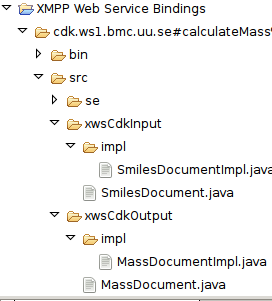
<p>The Bioclipse xws4j plugin actually puts the data model in my workspace, so that I can easily introspect the API:</p>

<p><img src="/blog/assets/images/autogeneration.png" alt="" /></p>

<p>The last three lines invoke the function (synchronously, as it’s cheap), and get the mass from the function output. BTW, I should
stress that a function does not require any specific implementation regarding synchronous or asynchronous calls. You write <strong>one</strong>
function, and can call it in either way you like. The library hides all IO-DATA details around that.</p>]]></content><author><name>Egon Willighagen</name></author><category term="xmpp" /><category term="java" /><category term="bioclipse" /><category term="web" /><summary type="html"><![CDATA[Getting back to some webservice stuff (see part #1 of this series)… actually, I’ll use cloud service from now on, since web service is reserved for SOAP/WSDL (see my EMBRACE presentation). Let me present this bit of JavaScript I just ran in Bioclipse2:]]></summary><media:thumbnail xmlns:media="http://search.yahoo.com/mrss/" url="http://egonw.github.io/blog/blog/assets/images/autogeneration.png" /><media:content medium="image" url="http://egonw.github.io/blog/blog/assets/images/autogeneration.png" xmlns:media="http://search.yahoo.com/mrss/" /></entry><entry><title type="html">EMBRACE workshop in Uppsala</title><link href="http://egonw.github.io/blog/2008/11/03/embrace-workshop-in-uppsala.html" rel="alternate" type="text/html" title="EMBRACE workshop in Uppsala" /><published>2008-11-03T00:00:00+00:00</published><updated>2008-11-03T00:00:00+00:00</updated><id>http://egonw.github.io/blog/2008/11/03/embrace-workshop-in-uppsala</id><content type="html" xml:base="http://egonw.github.io/blog/2008/11/03/embrace-workshop-in-uppsala.html"><![CDATA[<p>This Monday and Tuesday I will attend the EMBRACE workshop <a href="http://teacher.bmc.uu.se/webservicesworkshop/Welcome.html">Understanding, creating and deploying EMBRACE compliant WebServices</a>.
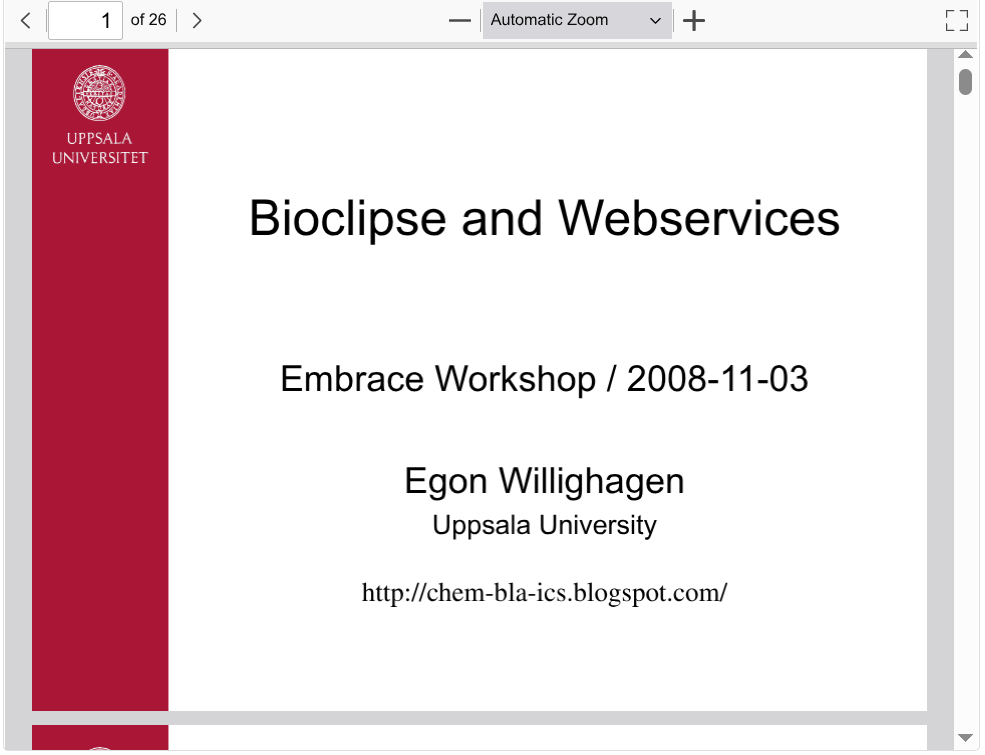
I will present there the ongoing work in Bioclipse to support services and web services in particular. The sheets of the presentation will look like:</p>

<p><a href="https://doi.org/10.5281/zenodo.2647677"><img src="/blog/assets/images/bioclipseWebserviceEmbrace.png" alt="" /></a></p>]]></content><author><name>Egon Willighagen</name></author><category term="bioclipse" /><category term="openscience" /><category term="justdoi:10.5281/zenodo.2647677" /><category term="web" /><summary type="html"><![CDATA[This Monday and Tuesday I will attend the EMBRACE workshop Understanding, creating and deploying EMBRACE compliant WebServices. I will present there the ongoing work in Bioclipse to support services and web services in particular. The sheets of the presentation will look like:]]></summary><media:thumbnail xmlns:media="http://search.yahoo.com/mrss/" url="http://egonw.github.io/blog/blog/assets/images/bioclipseWebserviceEmbrace.png" /><media:content medium="image" url="http://egonw.github.io/blog/blog/assets/images/bioclipseWebserviceEmbrace.png" xmlns:media="http://search.yahoo.com/mrss/" /></entry><entry><title type="html">Ubiquity fun: entering semantic markup as easy as running a Ubiquity command</title><link href="http://egonw.github.io/blog/2008/09/01/ubiquity-fun-entering-semantic-markup.html" rel="alternate" type="text/html" title="Ubiquity fun: entering semantic markup as easy as running a Ubiquity command" /><published>2008-09-01T00:10:00+00:00</published><updated>2008-09-01T00:10:00+00:00</updated><id>http://egonw.github.io/blog/2008/09/01/ubiquity-fun-entering-semantic-markup</id><content type="html" xml:base="http://egonw.github.io/blog/2008/09/01/ubiquity-fun-entering-semantic-markup.html"><![CDATA[<p>Now, the <a href="http://chem-bla-ics.blogspot.com/2008/09/ubiquity-fun-resolving-dois.html">DOI ubiquity scripts</a> I just blogged about,
was just the beginning of things. Me exploring the environment and learning the JavaScript language.</p>

<p>I start to become really interesting when we use these technologies to improve things. I am still not sure people will like the
command line nature, but at least I will be a happy user. This is the setting: I’m blogging about some chemistry, like to add an
InChI (or InChIKey) and add that <a href="http://chem-bla-ics.blogspot.com/2006/12/including-smiles-cml-and-inchi-in.html">cool sechemtic markup</a>
people have been blogging about, but I do not know (or want to know) the HTML details for that.</p>

<p>Well, no worries, no more. Here comes <em>sechemtic-inchi</em> (<a href="http://blueobelisk.sourceforge.net/people/egonw/sechemtic-inchi.html">installer here</a>)!</p>

<h2 id="step-1">Step 1</h2>

<p>I type in the InChI I want in my blog (example showing that of <a href="http://en.wikipedia.org/wiki/Methane">methane</a>):</p>

<p><img src="/blog/assets/images/ubiSechemticStep1.png" alt="" /></p>

<p>And, I select the InChI:</p>

<p><img src="/blog/assets/images/ubiSechemticStep1.5.png" alt="" /></p>

<p>After which I hit the Ubiquity shortcut (ALT-SPACE on Linux) and I type <em>sechemtic-inchi</em>:</p>

<p><img src="/blog/assets/images/ubiSechemticStep2.png" alt="" /></p>

<p>And, viola, there is my RDFa HTML code for chemistry:</p>

<p><img src="/blog/assets/images/ubiSechemticStep3.png" alt="" /></p>

<p>Now, with only minor amounts of fantasy, you can imagine where this is going: SMILES, InChiKey, etc, etc. Hook it up with
<a href="http://rguha.wordpress.com/2008/08/30/ubiquity-and-chemical-information/">chemistry webservices</a> to autoconvert
SMILES to InChIKeys, and Bob’s your uncle.</p>]]></content><author><name>Egon Willighagen</name></author><category term="rdf" /><category term="javascript" /><category term="web" /><category term="ubiquity" /><category term="rdfa" /><summary type="html"><![CDATA[Now, the DOI ubiquity scripts I just blogged about, was just the beginning of things. Me exploring the environment and learning the JavaScript language.]]></summary><media:thumbnail xmlns:media="http://search.yahoo.com/mrss/" url="http://egonw.github.io/blog/blog/assets/images/ubiSechemticStep1.5.png" /><media:content medium="image" url="http://egonw.github.io/blog/blog/assets/images/ubiSechemticStep1.5.png" xmlns:media="http://search.yahoo.com/mrss/" /></entry><entry><title type="html">Ubiquity fun: resolving DOIs</title><link href="http://egonw.github.io/blog/2008/09/01/ubiquity-fun-resolving-dois.html" rel="alternate" type="text/html" title="Ubiquity fun: resolving DOIs" /><published>2008-09-01T00:00:00+00:00</published><updated>2008-09-01T00:00:00+00:00</updated><id>http://egonw.github.io/blog/2008/09/01/ubiquity-fun-resolving-dois</id><content type="html" xml:base="http://egonw.github.io/blog/2008/09/01/ubiquity-fun-resolving-dois.html"><![CDATA[<p>Now, I’m really after something else, but here’s my first <a href="https://wiki.mozilla.org/Labs/Ubiquity">Ubiquity</a>
<a href="http://blueobelisk.sourceforge.net/people/egonw/ubiquity.html">scripts</a>. It allow you to select a DOI on any
web page (which really only makes sense if it is not already a hyperlink), you hit ALT-SPACE (Linux), CTRL-SPACE (Windows),
or whatever the shortcut is on your operating system, and type <em>resolve-doi</em> and it will automatically convert the DOI
into a hyperlink to look up the paper.</p>

<p>What I am actually interested in, is being able to use this command in a blog editing environment; however, I
have not managed to get that working in one command. And because I am apparently not able to put in two ubiquity
commands in blog items, you need to go to <a href="http://blueobelisk.sourceforge.net/people/egonw/ubiquity.html">this page</a>.</p>

<p>Second warning. I have only tried them with Ubiquity 0.1, not 0.1.1, or even later.</p>

<p>For the curious, the script looks like:</p>

<div class="language-javascript highlighter-rouge"><div class="highlight"><pre class="highlight"><code><span class="nx">CmdUtils</span><span class="p">.</span><span class="nc">CreateCommand</span><span class="p">({</span>
  <span class="na">name</span><span class="p">:</span> <span class="dl">"</span><span class="s2">resolve-doi</span><span class="dl">"</span><span class="p">,</span>
  <span class="na">homepage</span><span class="p">:</span> <span class="dl">"</span><span class="s2">http://chem-bla-ics.blogspot.com/</span><span class="dl">"</span><span class="p">,</span>
  <span class="na">author</span><span class="p">:</span> <span class="p">{</span> <span class="na">name</span><span class="p">:</span> <span class="dl">"</span><span class="s2">Egon Willighagen</span><span class="dl">"</span><span class="p">,</span> <span class="na">email</span><span class="p">:</span> <span class="dl">"</span><span class="s2">egon.willighagen@gmail.com</span><span class="dl">"</span><span class="p">},</span>
  <span class="na">description</span><span class="p">:</span> <span class="dl">"</span><span class="s2">Resolves a DOI into a URL</span><span class="dl">"</span><span class="p">,</span>
  <span class="na">license</span><span class="p">:</span> <span class="dl">"</span><span class="s2">GPL</span><span class="dl">"</span><span class="p">,</span>
  <span class="na">takes</span><span class="p">:</span> <span class="p">{</span><span class="dl">"</span><span class="s2">doi</span><span class="dl">"</span><span class="p">:</span> <span class="nx">noun_arb_text</span><span class="p">},</span>

  <span class="na">preview</span><span class="p">:</span> <span class="kd">function</span><span class="p">(</span> <span class="nx">pblock</span><span class="p">,</span> <span class="nx">doi</span> <span class="p">)</span> <span class="p">{</span>
    <span class="kd">var</span> <span class="nx">msg</span> <span class="o">=</span> <span class="dl">'</span><span class="s1">Inserts a URL for the DOI: ${doi}</span><span class="dl">'</span><span class="p">;</span>
    <span class="kd">var</span> <span class="nx">d</span> <span class="o">=</span> <span class="nx">doi</span><span class="p">.</span><span class="nx">text</span> <span class="o">||</span> <span class="nx">CmdUtils</span><span class="p">.</span><span class="nf">getSelection</span><span class="p">();</span>
    <span class="nx">pblock</span><span class="p">.</span><span class="nx">innerHTML</span> <span class="o">=</span> <span class="nx">CmdUtils</span><span class="p">.</span><span class="nf">renderTemplate</span><span class="p">(</span><span class="nx">msg</span><span class="p">,</span> <span class="p">{</span><span class="na">doi</span><span class="p">:</span> <span class="nx">d</span><span class="p">});</span>
  <span class="p">},</span>

  <span class="na">execute</span><span class="p">:</span> <span class="kd">function</span><span class="p">(</span> <span class="nx">doi</span> <span class="p">)</span> <span class="p">{</span>
    <span class="kd">var</span> <span class="nx">msg</span> <span class="o">=</span> <span class="dl">'</span><span class="s1">&lt;a href="http://dx.doi.org/${doi}"&gt;${doi}&lt;/a&gt;</span><span class="dl">'</span><span class="p">;</span>
    <span class="kd">var</span> <span class="nx">d</span> <span class="o">=</span> <span class="nx">doi</span><span class="p">.</span><span class="nx">text</span> <span class="o">||</span> <span class="nx">CmdUtils</span><span class="p">.</span><span class="nf">getSelection</span><span class="p">();</span>
    <span class="kd">var</span> <span class="nx">newText</span> <span class="o">=</span> <span class="nx">CmdUtils</span><span class="p">.</span><span class="nf">renderTemplate</span><span class="p">(</span><span class="nx">msg</span><span class="p">,</span> <span class="p">{</span><span class="na">doi</span><span class="p">:</span> <span class="nx">d</span><span class="p">});</span>
    <span class="nx">CmdUtils</span><span class="p">.</span><span class="nf">setSelection</span><span class="p">(</span><span class="nx">newText</span><span class="p">);</span>
  <span class="p">}</span>
<span class="p">})</span>
</code></pre></div></div>

<p>Comments on this code most welcome! It’s <a href="http://www.gnu.org/copyleft/gpl.html">GPL</a>. Details can be found in
<a href="https://wiki.mozilla.org/Labs/Ubiquity/Ubiquity_0.1_Author_Tutorial">this tutorial</a> and examples in
<a href="http://rguha.wordpress.com/2008/08/30/ubiquity-and-chemical-information/">Rajarshi’s blog</a>.</p>]]></content><author><name>Egon Willighagen</name></author><category term="javascript" /><category term="web" /><category term="doi" /><category term="ubiquity" /><summary type="html"><![CDATA[Now, I’m really after something else, but here’s my first Ubiquity scripts. It allow you to select a DOI on any web page (which really only makes sense if it is not already a hyperlink), you hit ALT-SPACE (Linux), CTRL-SPACE (Windows), or whatever the shortcut is on your operating system, and type resolve-doi and it will automatically convert the DOI into a hyperlink to look up the paper.]]></summary></entry><entry><title type="html">kfile_chemical gets XYZ, Mol2, SMILES, VMD and GenBank support</title><link href="http://egonw.github.io/blog/2005/10/29/kfilechemical-gets-xyz-mol2-smiles-vmd.html" rel="alternate" type="text/html" title="kfile_chemical gets XYZ, Mol2, SMILES, VMD and GenBank support" /><published>2005-10-29T00:00:00+00:00</published><updated>2005-10-29T00:00:00+00:00</updated><id>http://egonw.github.io/blog/2005/10/29/kfilechemical-gets-xyz-mol2-smiles-vmd</id><content type="html" xml:base="http://egonw.github.io/blog/2005/10/29/kfilechemical-gets-xyz-mol2-smiles-vmd.html"><![CDATA[<p>Jerome Pansanel contributed new patches for <a href="http://www.kde-apps.org/content/show.php?content=28995">kfile_chemical</a>; on
Monday actually, but I have been busy with other things, among which a presentation I have to give next Monday for some 100+
analytical chemists. The patch adds support to <a href="http://www.kde.org/">KDE</a> for five new chemical MIMEs: XYZ, Mol2, SMILES,
VMD and GenBank. Therefore, I just released a new version (0.10), and added an announcement to
<a href="http://freshmeat.net/projects/kfile_chemical/">Freshmeat.net</a>.</p>

<p>As a reminder, version 1.0 will have all chemical mime types supported, after which I will initiate a process to formalize
the meta data we want the kfile plugins to give, which will lead to the 2.0 release. So far, I had in mind that the next
step was to make the plugins ready for KDE 4.0, but I became aware of the <a href="http://developer.kde.org/documentation/library/kdeqt/kde3arch/mime.html">mime magic</a>
as implemented in <a href="http://developer.kde.org/documentation/library/3.1-api/classref/kio/KMimeMagic.html">KMimeMagic</a>.</p>

<p>So, concluding, I might squeeze in another beta release 3.0, where this magic gets addressed; knowing that it will definately
not work for all files, but hopefully it will for files with stupid file extensions like .log.</p>]]></content><author><name>Egon Willighagen</name></author><category term="kde" /><category term="chemistry" /><category term="web" /><summary type="html"><![CDATA[Jerome Pansanel contributed new patches for kfile_chemical; on Monday actually, but I have been busy with other things, among which a presentation I have to give next Monday for some 100+ analytical chemists. The patch adds support to KDE for five new chemical MIMEs: XYZ, Mol2, SMILES, VMD and GenBank. Therefore, I just released a new version (0.10), and added an announcement to Freshmeat.net.]]></summary></entry></feed>